
WebRTC Leak: Why Sites See Your Real IP With a VPN On
Your VPN is on, but a leak test still shows your real IP. Why WebRTC slips past browser extensions and split tunnels, how to check in 30 seconds, and how to fix it in Chrome, Brave, Firefox and Safari.
You switch the VPN on, open a leak test and your real IP is sitting right there in the WebRTC row. The VPN is not broken. A WebRTC leak happens because one browser feature asks for your address in a way that can travel outside the tunnel. Below: how the leak works, how to check for it in about 30 seconds, which VPN setups are affected, and how to fix it in each major browser without breaking your video calls.
Why does a WebRTC leak happen?
WebRTC is the part of your browser that runs video calls and voice chats. Before a call it sends a small UDP request to a STUN server, which replies with the public address it saw. If that request goes around your VPN, the reply contains your real IP, and any page can read it with a few lines of JavaScript. No camera permission is needed.
The page does not have to be a call service. A leak-check script runs the same way on a news site or a forum.
How to check for a WebRTC leak in 30 seconds
- Connect your VPN as you normally do.
- Open our leak test. It runs on our own server, needs no sign-up and does not store results.
- Look at two rows: the main address (what our server sees) and the WebRTC row (what your browser reveals).
- Run it again in every browser you use. Chrome and Firefox on the same computer can give different answers.
Here is how to read the WebRTC row:
| What you see | What it means |
|---|---|
| The WebRTC address matches your connection address | No leak. The STUN request went through the VPN |
| WebRTC shows a different public address | Leak. A site can learn that address around the tunnel |
Only names ending in .local or home addresses like 192.168.x.x | No leak. The browser hides your local network address, your external one stays private |
| No addresses at all | WebRTC is disabled or restricted by a setting or an extension |
| One protocol revealed, nothing to compare it with | Inconclusive. We don't call it a leak without a matching measurement |
If the test says "leak", turn the VPN off and run it once more. If the "leaked" address equals the one you see with the VPN off, that is your real address.
Which VPN setups leak and which don't
The leak depends less on the VPN brand than on how the connection is built.
| Setup | Does WebRTC go through the VPN? | Why |
|---|---|---|
| VPN app routing all device traffic | Yes | The tunnel sits below the browser, so UDP to STUN is tunneled too |
| VPN app with split tunneling | Sometimes | If the browser or the STUN server is excluded, the request goes direct |
| Desktop client in "system proxy" mode | Often not | A system proxy carries HTTP(S) traffic; UDP from WebRTC can travel outside it |
| Browser VPN extension | Not by default | Browsers let extensions set a proxy for web requests, WebRTC UDP is outside it |
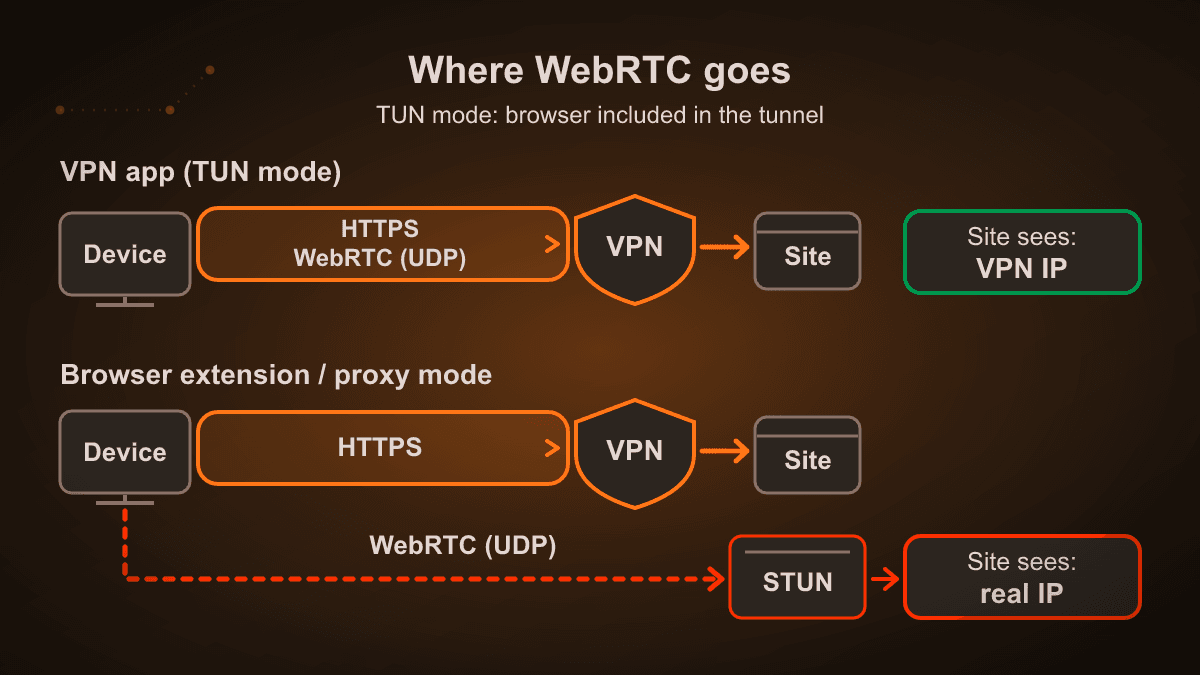
The last row surprises people the most. A browser extension is a proxy, even if the store page calls it a VPN. Chrome gives extensions one lever for this, a privacy setting called webRTCIPHandlingPolicy. Its strictest value, disable_non_proxied_udp, stops WebRTC from sending UDP outside the proxy. An extension has to ask for permission to change it, and it has to choose to.
We ran into this ourselves while building the MeerGuard browser extension. With the proxy on, a test page still saw the real address through WebRTC. The fix exists, but it costs something, which brings us to the trade-off.
Why blocking WebRTC breaks calls
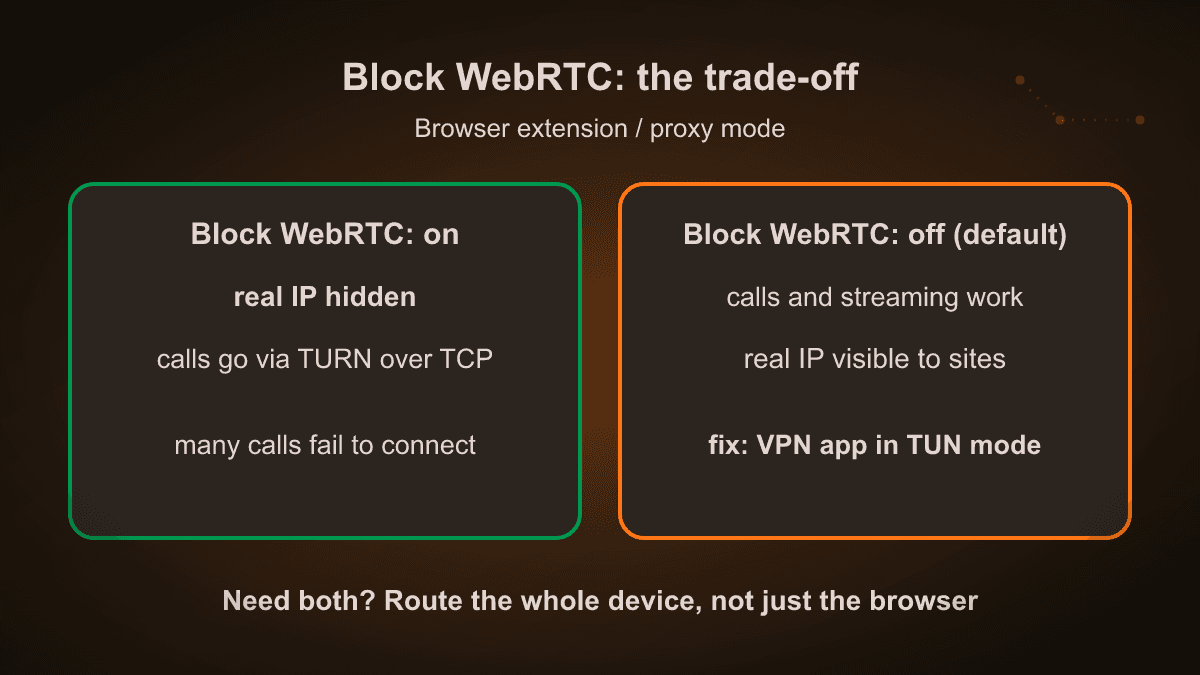
When WebRTC cannot send UDP outside the proxy, it has to relay calls over TCP through a TURN server. Many services don't offer that path, so the call simply never connects. Browser calls, the web versions of some messengers and some streaming players stop working.
So our extension has a Block WebRTC checkbox in its settings, and it is off by default. The settings screen says it plainly: "Browser calls, messengers and streaming may stop working". When you tick it, the browser asks you to grant the privacy permission, and from then on the extension applies the strict policy every time it connects.
Two things can still get in the way, and the extension tells you about both.
Chrome keeps one value for this setting, and whichever extension set it last wins. Ad blockers often touch it. If that happens, the popup says "Another extension controls WebRTC".
On work computers an administrator may have locked the setting. No extension can change it then, and we say so instead of pretending.
If you need both privacy and working calls, the honest answer is a VPN app that routes all device traffic. Then there is nothing to block: WebRTC goes through the tunnel like everything else.
How to fix a WebRTC leak in your browser
Start with the cheapest fix. If you use a VPN app, check that split tunneling does not exclude your browser and that the app runs in full-tunnel (TUN) mode rather than system-proxy mode. Then run the leak test again. Only if you must stay on a browser-only setup, change the browser itself.
Chrome and Edge
There is no WebRTC switch in Chrome's or Edge's normal settings. Your options are a VPN app that covers the whole device, or an extension that sets the strict WebRTC policy. In MeerGuard that is the Block WebRTC checkbox described above. After any change, reconnect and test again.
Brave
Brave has the setting built in: Settings → Privacy and security → WebRTC IP handling policy. "Disable non-proxied UDP" is the strictest option, with the same call trade-off. If the setting keeps jumping back, an extension is controlling it. uBlock Origin's "Prevent WebRTC from leaking local IP addresses" option is a known cause.
Firefox
Firefox is the one browser where you can switch WebRTC off completely:
- Type
about:configin the address bar and accept the warning. - Search for
media.peerconnection.enabled. - Double-click it so the value becomes
false.
Set it back to true when you need a browser call. Don't touch media.peerconnection.ice.obfuscate_host_addresses: switching it off exposes your local address instead of hiding it.
Safari
Safari hides your local addresses from sites by default and only reveals them after you grant camera or microphone access. Your public address is a different matter. It depends on whether the STUN request goes through the VPN. Run the test with and without granting camera permission on the test page; if a different public address shows up, the route is the problem, not Safari.
WebRTC isn't the only leak: IPv6, DNS and time zone
A clean WebRTC row doesn't mean the whole connection is clean. The same leak test checks two more things, and DNS has its own page.
IPv6
Some VPNs carry only IPv4. If your provider gives you IPv6, that traffic can leave through your normal connection. The test compares the network behind your IPv4 and IPv6 addresses. Different networks with the VPN on means part of your traffic skips the tunnel.
DNS
Every time you open a site, something turns its name into an address. If those lookups go to your internet provider while the VPN is on, the provider sees the sites you visit. Our DNS check runs on our own DNS server and shows who answered your lookups. Two common causes:
- On Windows, a feature called Smart Multi-Homed Name Resolution sends lookups through every network adapter at once, including the one outside the VPN.
- Secure DNS in the browser (DNS over HTTPS) sends lookups straight to Cloudflare, Google or another resolver. The provider can't read them, but they don't follow your VPN route either.
Time zone
If your device clock says New York and your VPN exit is in Frankfurt, a site can see the mismatch. It doesn't reveal your address, but it is a detail that makes you stand out. The test shows it as a separate row.
What MeerGuard does about it
MeerGuard connects through the Happ app. On iPhone and Android it covers the whole device, so WebRTC, DNS and everything else go through the same tunnel. On Windows, macOS and Linux, Happ has two modes, and the setting matters: keep TUN on and Proxy off. In Proxy mode only the browser goes through the tunnel, which puts you back in the system-proxy row of the table above.
The connection uses VLESS with Reality, there are servers in the USA, Germany and Russia, and every plan covers three devices with unlimited traffic. Setup happens in the Telegram bot or on the download page, and you can check the result on the leak test a minute later.
If you only need the browser, the extension gives 2 GB a month free without an account. Just remember the trade-off above: it protects browser traffic, and WebRTC only after you tick Block WebRTC.
If you're on hotel or airport Wi-Fi, also read our guide on what a VPN protects you from on public networks.
Sources
- Chrome extension API,
chrome.privacy.network.webRTCIPHandlingPolicyand its values: developer.chrome.com/docs/extensions/reference/api/privacy (checked 14.10.2026) - Chrome team, "Private IP addresses exposed by WebRTC changing to mDNS hostnames", discuss-webrtc group, 2019
- Firefox 74 release, March 2020: local addresses in WebRTC hidden behind mDNS names
- IETF draft "mDNS ICE candidates" (Apple co-author): Safari filters host candidates until camera or microphone access is granted
- Mullvad help, disabling WebRTC in Firefox via
media.peerconnection.enabled - Brave wiki, "WebRTC Custom Settings"
- MeerGuard extension source and settings text, versions from 25.09.2026
Related articles
Is a VPN Illegal in Utah? SB 73 Explained (2026)
No, using a VPN in Utah is legal. What SB 73 actually requires from websites, what a federal judge blocked on 24 September 2026, why the case is paused until 2027, and what it means for your privacy.
Hotel and Airport Wi-Fi in 2026: How Travelers Get Hacked and How to Prevent It
1 in 4 travelers has been hacked on public Wi-Fi abroad. How evil-twin hotspots and man-in-the-middle attacks work, what actually protects you, and why a VPN is the non-negotiable part.
Age Verification in the UK and EU: What It Means for Your Privacy in 2026
The UK Online Safety Act triggered a 1,000%+ VPN surge, and EU-wide age checks arrive in 2026. What adults are actually worried about — and how to keep your ID off third-party servers.
Try MeerGuard VPN
Three days of full access for 1 ₽. No auto-renewal.